In this article
TL;DR
A conjoint analysis example is a streaming service testing which features and price to put in its plans. Participants choose between complete plans, and the results show how much each feature affects their choice and which plan would win the most share.
This guide follows one example study from start to finish. It covers choosing the features and levels, building the choice tasks, reading the results and checking for mistakes before launch, plus when to use a different type of conjoint.
It’s written for insights teams at consumer brands who are planning a conjoint study or need to explain one to stakeholders.
Conjoint shows what consumers choose but not why. Conveo runs follow-up video interviews that explain the results.
Conjoint analysis is easy to understand in theory: present people with different product options and see which combination they prefer. But applying it to a real pricing or feature decision is harder.
Each study needs a set of attributes to test and a way to structure the choices, and the results come as utility scores that don’t turn straight into a recommendation. Without a worked example to follow, a product or pricing decision can end up resting on a study that was set up or read wrongly.
This guide follows one conjoint analysis example, a streaming service testing its plans, from choosing the attributes to reading the results, and shows how follow-up interviews explain the “why” behind consumer preferences. You’ll be able to set up your own study with the same steps and turn its results into a recommendation your team can act on.
What conjoint analysis measures
Conjoint analysis measures how much each product feature, including price, influences which version of a product consumers choose. It does this by making them trade features off against each other, which rating scales can’t do. Ask consumers to rate features one at a time and most features score highly, because rating a feature doesn’t cost them anything.
In a conjoint study, participants see a few versions of a product, each with a different mix of features and a price, and pick the one they’d buy. They repeat this over several screens.
A statistical model then works out how much each feature level raises or lowers the chance of a version being picked. These scores are called part-worth utilities. Comparing the range of scores across features shows which ones have the most influence on choice.
Conjoint analysis studies work well for pricing research, where you need to know how much more consumers would pay for a feature. They also suit decisions about what goes into a new product, or what can come out of a cheaper version of an existing one. If you only need to rank a list of features, MaxDiff is often a better fit than conjoint, because it works with a smaller sample.
The example: subscription streaming service
The clearest way to see how conjoint works is to follow one study from design to output. Take a streaming service launching in a new market with a premium tier and a cheaper budget tier. Before setting prices, the insights team needs to know which features consumers will pay extra for, and which can come out of the budget tier without it feeling like poor value.
The following sections show how to set up and run a conjoint analysis, using the streaming service to illustrate each step.
1. Choosing the attributes and levels
Attributes are the features a conjoint study tests, for example, price. Levels are the options within each attribute, such as $11.99 or $15.99. Teams often choose attributes from internal meetings, consumer research, or a combination of both.
Teams can brainstorm attributes in internal workshops, drawing on their knowledge of the market and assumptions about what consumers value. This is a useful starting point, though it can overlook factors consumers consider when making real decisions.
Qualitative research can help teams identify those factors by asking people to describe specific past experiences. For example, asking someone to walk through the last time they chose between streaming services might reveal that they prioritized downloading shows for their commute. Teams use AI-moderated video interviews on Conveo to run these discovery conversations before the attribute list is locked.
This approach gives the team a specific attribute to test in the conjoint study. A brainstorm might instead produce an attribute like HD quality, even if that wasn’t a deciding factor for the consumer.
Example
In the streaming example, the team started in a workshop by listing the features competitors use to separate their cheaper and premium plans: content library size, HD quality, multiple user profiles, and monthly price.
Interviews with the target audience in the new market changed it in two ways. The commute downloads came up often enough to add offline downloads as a fifth attribute. “Multiple user profiles” turned out to be about families getting kicked off when two people watched at once, so the study tests simultaneous streams.
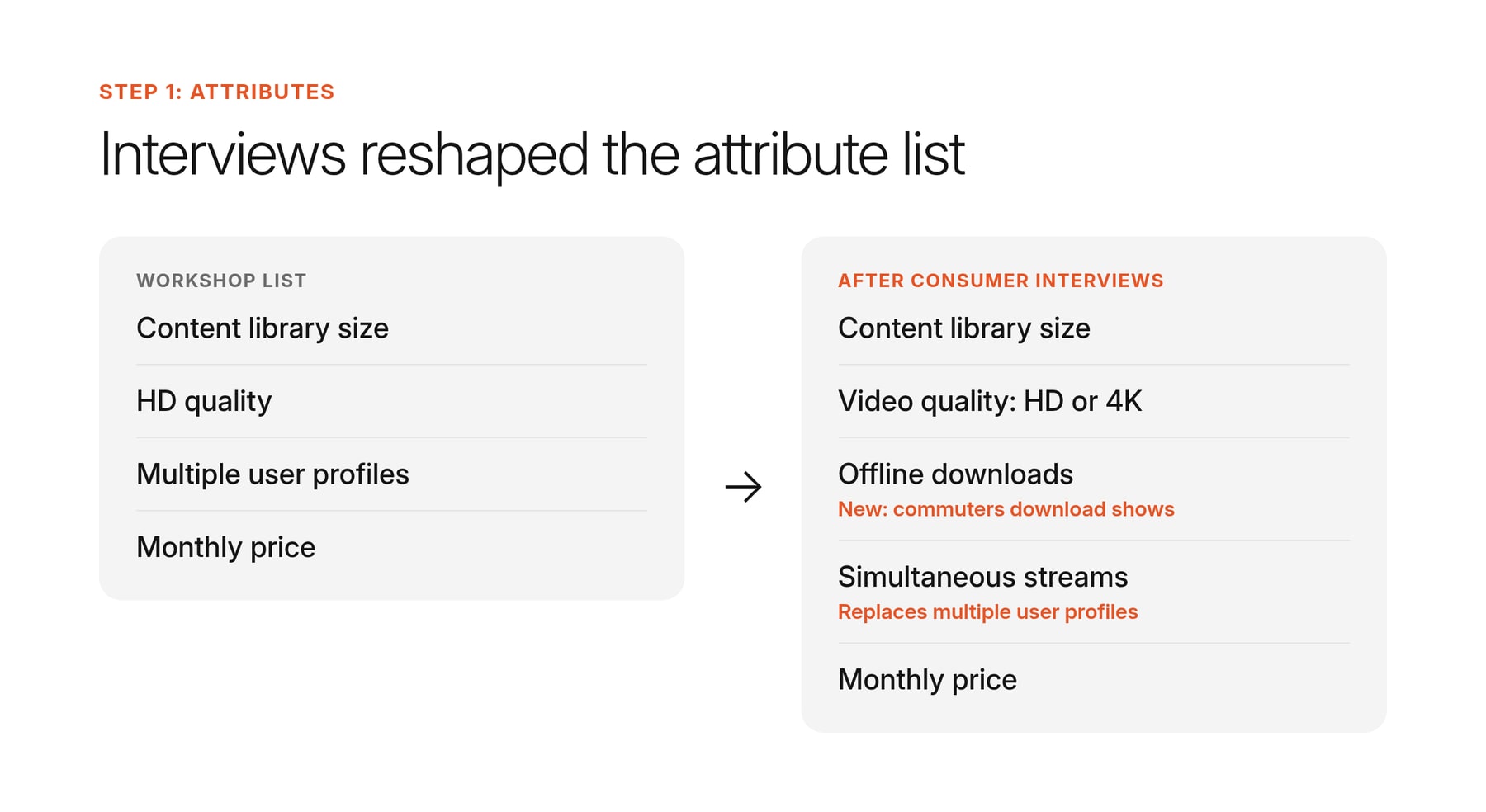
Library size and video quality stayed because they’re the clearest ways to separate a premium tier from a budget one, and price has to be in the study to set the price of each tier.
As a rule of thumb, an attribute in a conjoint analysis should have two to five levels to provide enough data without overwhelming participants. The team’s final selection looks like this:
| Attribute | Levels |
|---|---|
| Content library size | 3,000 titles, 6,000 titles, 10,000 titles |
| Video quality | HD, 4K |
| Offline downloads | None, up to 10 titles, unlimited |
| Simultaneous streams | 1, 2, 4 |
| Monthly price | $7.99, $11.99, $15.99 |
2. Building the choice tasks
In choice-based conjoint (CBC), the most common type of conjoint analysis, each screen of the conjoint survey is a choice task.
Participants see a few product concepts side by side, each combining one level of every attribute, and pick their preferred option. Sawtooth Software, which makes conjoint analysis software and publishes guidance on study design, recommends showing three to five concepts per task for most marketing studies.
Testing every possible combination isn’t practical, because even a small study can produce more product versions than anyone could compare. Conjoint software uses a fractional design, which picks a subset of combinations so that each level appears about as often as the others and is shown alongside a mix of other levels. That’s enough for the statistical analysis to estimate a score for every level, though it limits how much the model can say about how features interact.
Each participant sees a series of these tasks. Sawtooth recommends eight to 15. Beyond that, survey fatigue sets in, and people start clicking through or picking the same position every time, which hurts data quality.
Before fielding, it helps to ask a colleague who doesn’t know the study to complete a few tasks and talk through their choices. If they can’t tell two concepts apart, or stall on a combination that makes no sense, participants will have the same problem.
Example
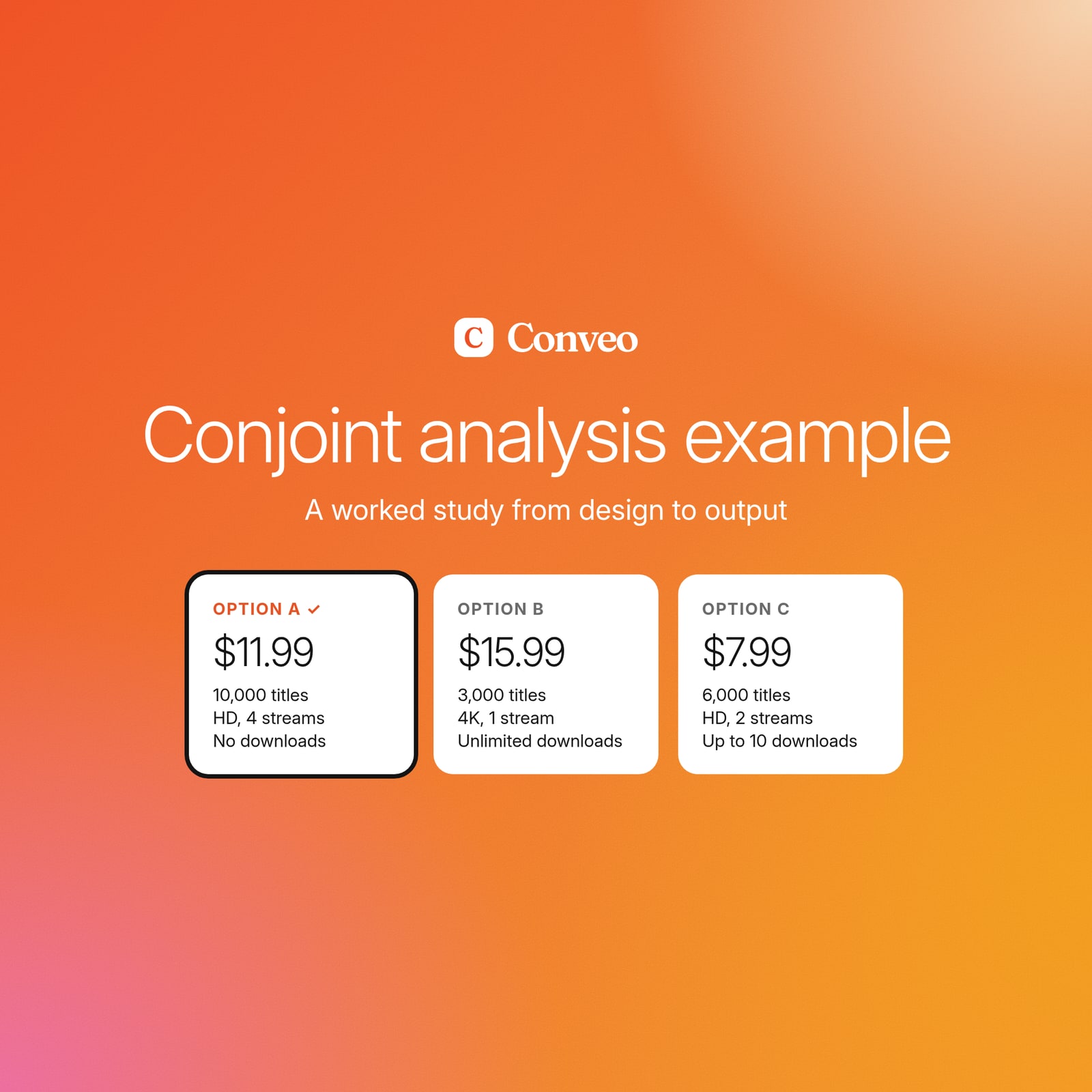
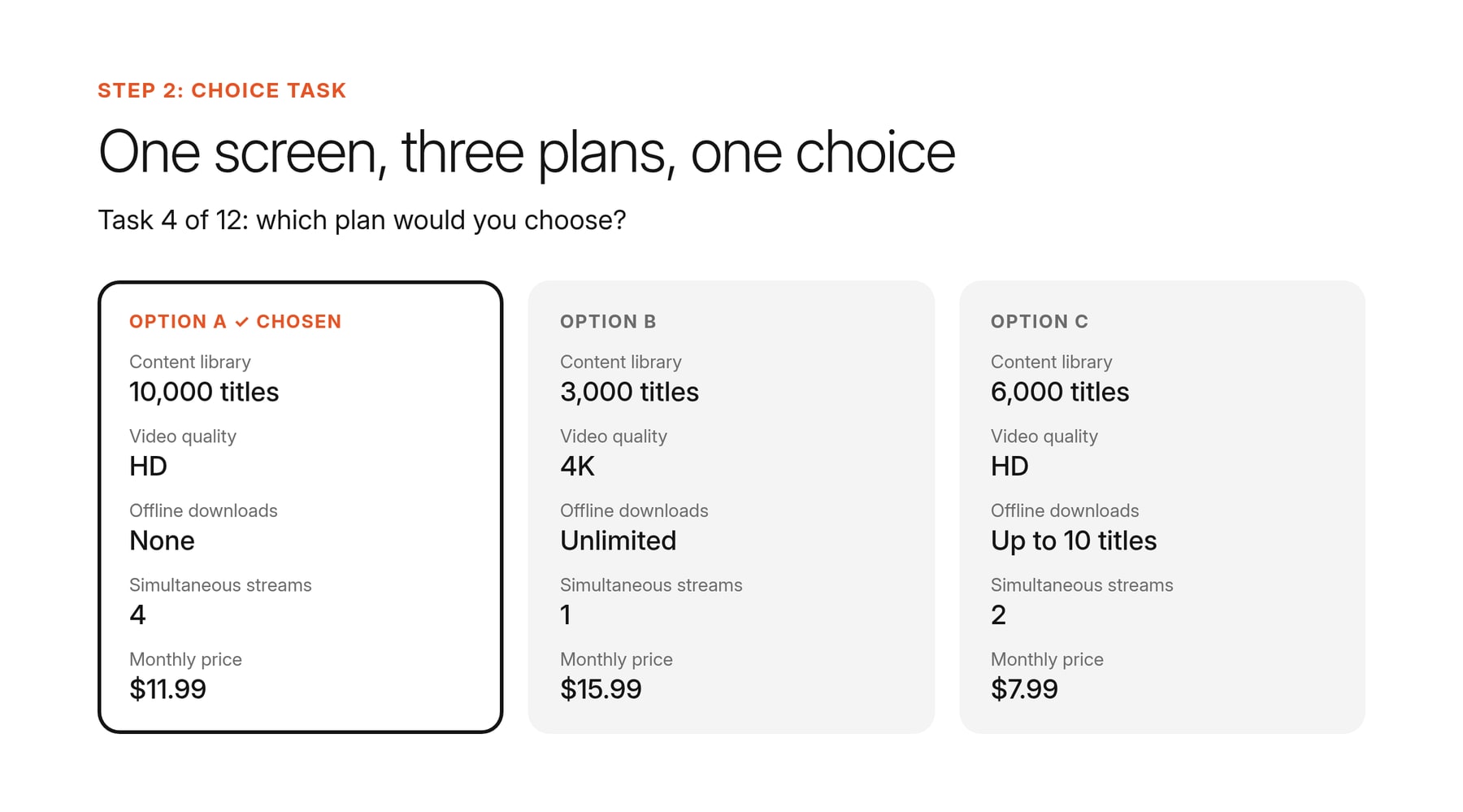
The streaming service’s five attributes produce 162 possible versions of the service (3 × 2 × 3 × 3 × 3). Each participant sees 12 tasks with three concepts each, like this one:
| Option A | Option B | Option C | |
|---|---|---|---|
| Content library | 10,000 titles | 3,000 titles | 6,000 titles |
| Video quality | HD | 4K | HD |
| Offline downloads | None | Unlimited | Up to 10 titles |
| Simultaneous streams | 4 | 1 | 2 |
| Monthly price | $11.99 | $15.99 | $7.99 |
None of the options is best on everything. Choosing Option A means getting the biggest library and the most streams but giving up downloads, which is the kind of trade-off the study needs participants to make.
3. Interpreting the outputs
The main output of a conjoint study is a set of part-worth utilities: a score for each attribute level that shows how much it adds to or takes away from a product’s appeal. Two more outputs are built from the utilities: relative importance scores and a market simulator.
Part-worth utilities are relative within each attribute, so they’re read as differences. A level with a higher utility means participants showed a stronger preference for it when they had to give something else up to get it.
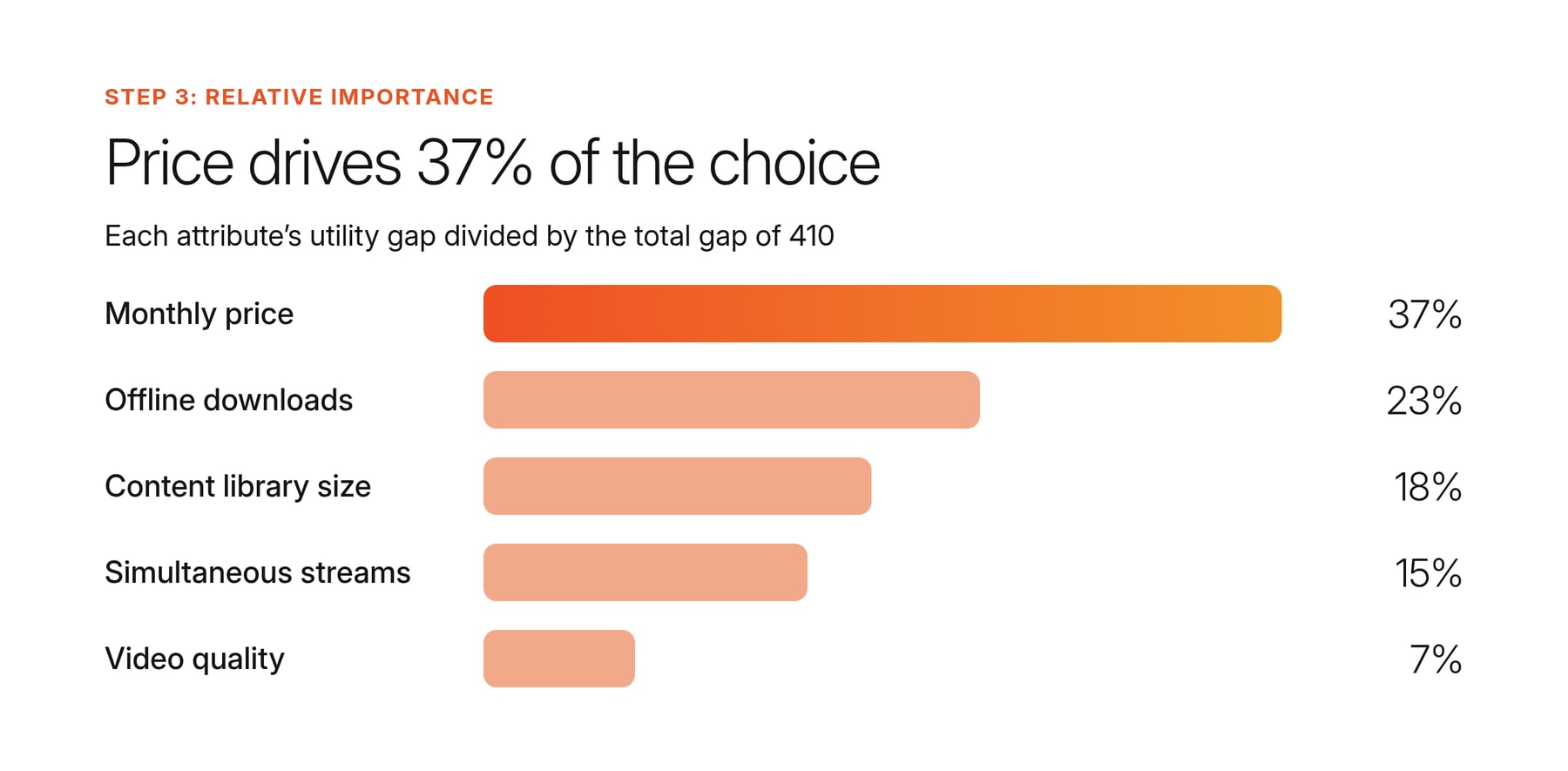
Relative importance scores show how much each attribute influenced choices overall, as a percentage. To calculate them, take the gap between each attribute’s highest and lowest utility, add up the gaps for all attributes, and divide each attribute’s gap by the total.
The market simulator is a tool, usually built into the conjoint software, where you enter product concepts and it uses the utilities to predict how participants would choose between them.
The result is a share of preference for each concept: how participants would split between those options if they were the only ones available. Real market share also depends on factors the study doesn’t test, like brand awareness and existing subscriptions, so the simulator is best used to compare options against each other.
Example
These were the conjoint analysis study’s part-worth utilities for the streaming service, with the relative importance score calculated for each attribute:
| Attribute | Levels (utility) | Gap | Relative importance |
|---|---|---|---|
| Monthly price | $7.99 (70), $11.99 (10), $15.99 (−80) | 150 | 37% |
| Offline downloads | None (−55), up to 10 titles (15), unlimited (40) | 95 | 23% |
| Content library size | 3,000 (−40), 6,000 (5), 10,000 (35) | 75 | 18% |
| Simultaneous streams | 1 (−35), 2 (10), 4 (25) | 60 | 15% |
| Video quality | HD (−15), 4K (15) | 30 | 7% |
The gaps add up to 410, so price’s importance is 150 ÷ 410, or 37%. Offline downloads matter more than library size, which backs up what the interviews suggested. Video quality matters least, so 4K alone won’t justify the premium price.
The team then entered three concepts into the market simulator: both planned tiers, plus the main competitor’s most popular plan, built from the same attributes. Including the competitor shows whether the tiers would win subscribers in the new market, or just split them between each other. The simulator predicted each concept’s share of preference:
| Concept | Features | Share of preference |
|---|---|---|
| Premium tier | 10,000 titles, 4K, unlimited downloads, 4 streams, $15.99 | 41% |
| Budget tier | 6,000 titles, HD, up to 10 downloads, 1 stream, $7.99 | 46% |
| Main competitor | 6,000 titles, HD, no downloads, 2 streams, $11.99 | 13% |
The competitor’s lack of downloads costs it heavily. Testing changes in the simulator also showed that adding a second stream to the budget tier raises its share. The team can now weigh that against the cost of offering it.
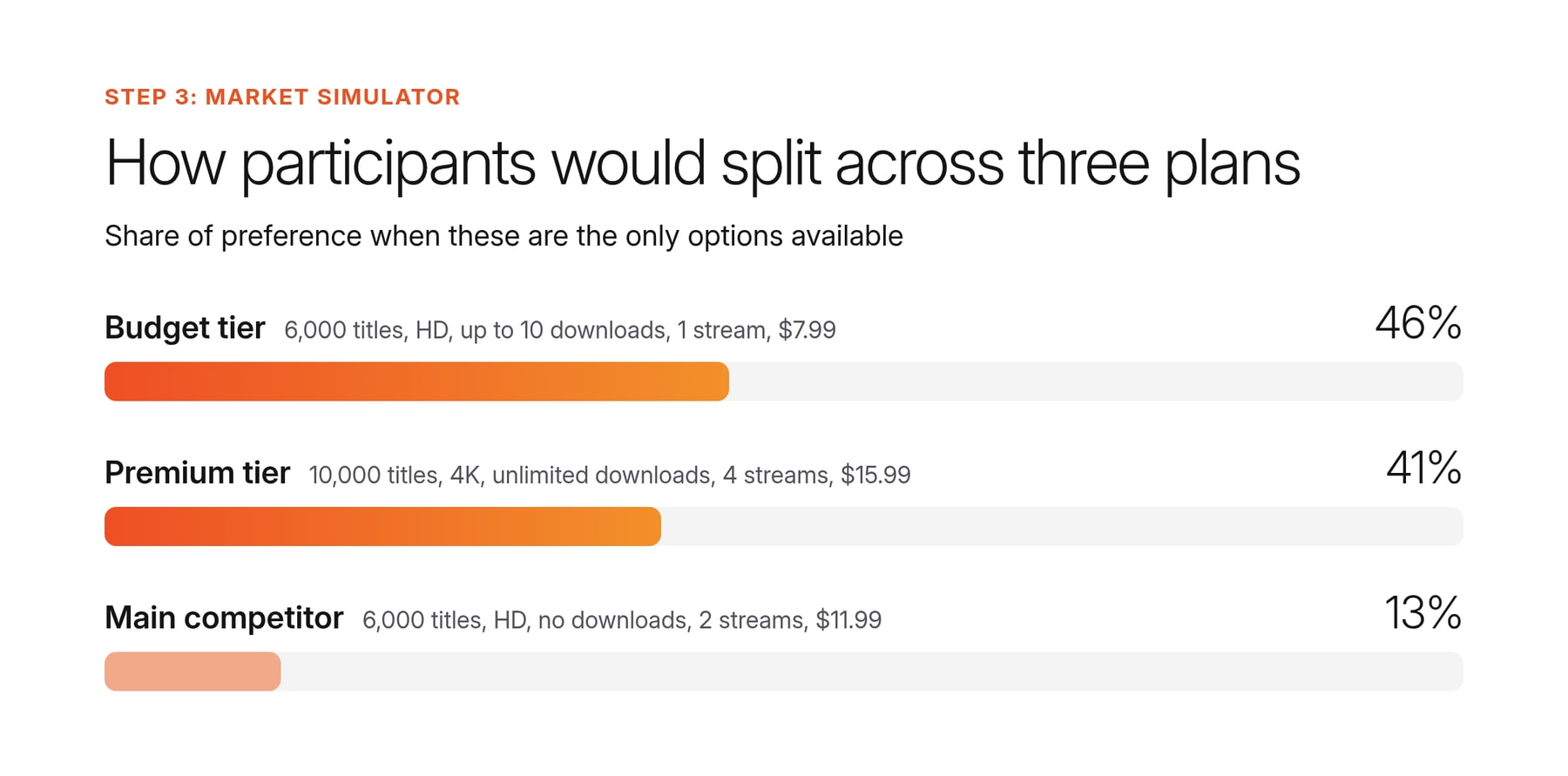
For the stakeholder readout, the team put the share chart on one page alongside two interview clips explaining the top drivers. One was a commuter on why downloads decide which service they keep, and one was a parent on what price would make them cancel. The chart shows what consumers chose, and the clips show the reasons behind it.
When to use CBC vs ACBC vs menu-based
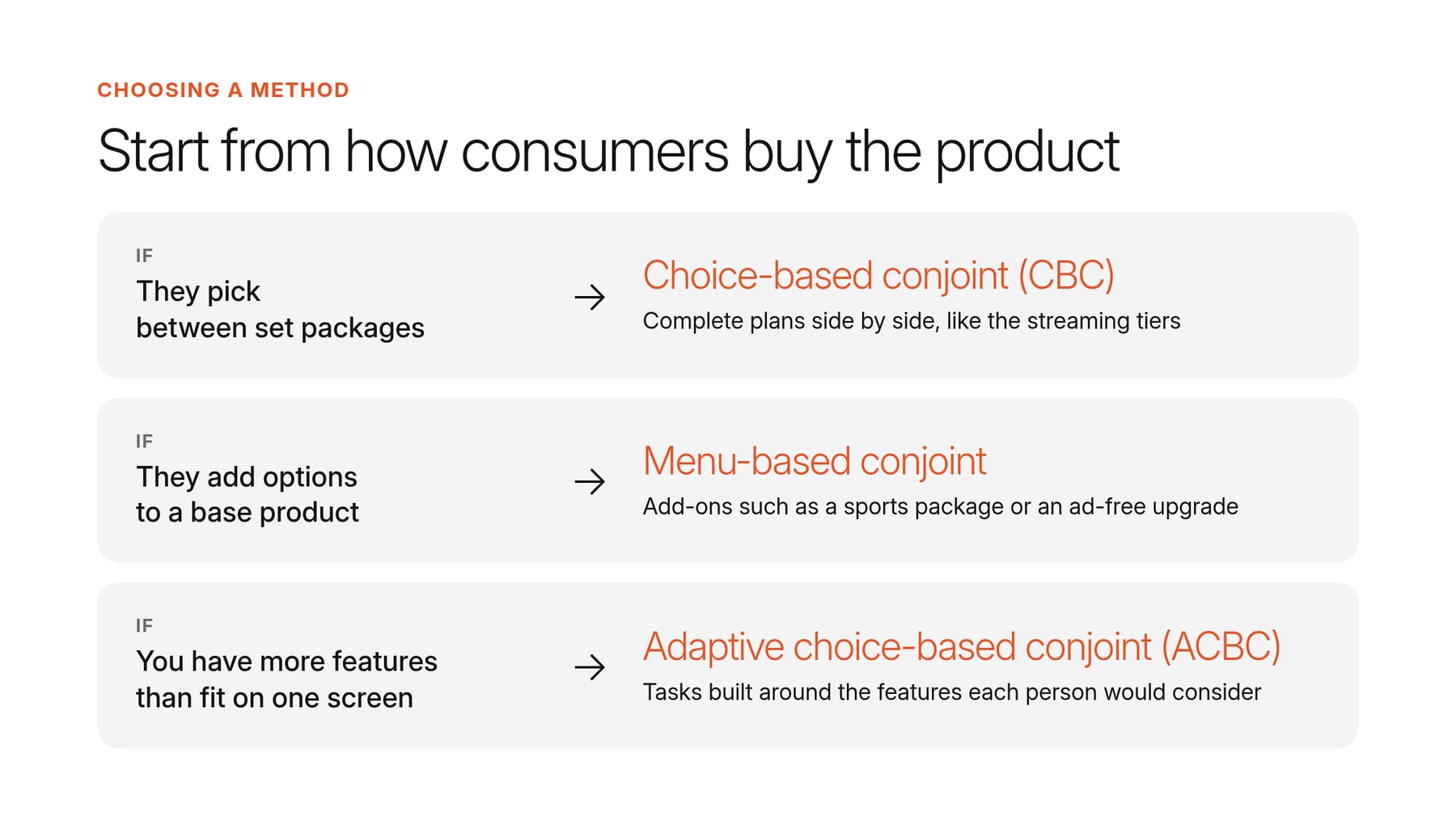
In the example, the streaming service used CBC conjoint as it’s the most popular choice. However, there are two other ways to run conjoint to be aware of before you do your own. Here’s how they compare:
| Method | What it is | Best for |
|---|---|---|
| Choice-based conjoint (CBC) | Participants see a few complete products side by side and pick the one they’d buy. Every product shows a level for each feature, so it’s a type of full profile conjoint. | Testing a small number of features on fixed packages, like the streaming plans. Most survey tools can run it. |
| Adaptive choice-based conjoint (ACBC) | It first asks each participant which features and levels they’d consider, then builds their choice tasks around those answers. | Testing more features than participants could weigh on one screen. The survey takes longer for each person, but you can need fewer participants. |
| Menu-based conjoint | Participants build their own product by picking options that each have their own price. | Testing add-ons on top of a base product, such as a sports package or an ad-free upgrade on a streaming plan. |
Start from how consumers buy the product. If they pick between set packages, CBC is enough. If they add options to a base product, or you have more features than fit on one screen, look at menu-based conjoint or ACBC.
Whichever type you choose, a few design mistakes can skew the results, and each one can be caught before the study goes live.
Common mistakes to check for before launching a conjoint study
Even with a framework to follow, mistakes can happen. Before you launch your own conjoint study, do these checks to avoid the most common problems.
| Mistake | How to avoid it |
|---|---|
| Participants ignore a feature and choose based on the others. | Soft-launch to a small group and check whether any attribute's utilities come out flat. Ask a few people to talk through their choices to see which features they actually weighed. |
| One option is better on every feature, so everyone picks it and the task shows nothing. | Read through the choice tasks before launch and remove any where one plan wins on everything. |
| Combinations that wouldn’t exist in the market, such as four-stream 4K at $7.99. | Set the software to block combinations you’d never sell. Block as few as you can, because each one reduces the combinations the study can test. |
| Participants pick the same position on every screen to get through faster. | Show one task twice. Flag participants who answer it differently, and remove those who also always pick the same position or finish much faster than everyone else. |
These checks make sure the study’s numbers are reliable. The reasons behind those numbers come from talking to the people who made the choices, through follow-up interviews using Consumer Understanding Infrastructure like Conveo.
"Conveo has definitely changed what we can pitch to clients, because it allows us to bridge the gaps between quantitative and qualitative methodologies and tell a more complete end-to-end story."
Fergus Navaratnam-Blair, VP Trends and Futures, National Research Group
How to pair conjoint with qualitative evidence
Follow-up interviews explain the conjoint results stakeholders are most likely to question. A drop in share at a higher price, for example, could come from a budget limit or from consumers not seeing enough value in the extra features, but without follow-up interviews you won’t know which.
Interviews also show when a choice task forced a trade-off that wouldn’t come up in a real decision. Participants have to pick an option on every screen, even when one of the attributes means nothing to them.
Invite conjoint respondents back from your own participant list, or use screener questions to recruit people who match the segment, and ask them to talk through the same trade-offs. On video, you also see how people choose. A participant who hesitates before picking the most expensive option, or sounds unsure explaining why, is a reason to look more closely at that preference.
Conveo runs these follow-ups as AI-moderated video interviews. It doesn't run conjoint analysis, but it can add a MaxDiff or pricing question to the interview, and the AI research assistant asks why participants answered the way they did. Start for free or book a demo to see how it works.
See a Conveo AI-moderated interview in action:

Frequently asked questions
What are some conjoint analysis examples?
Conjoint analysis is a survey-based statistical technique used in market research to show which features and price points consumers will trade off against each other. A smartphone manufacturer might test battery life against price to find the optimal product configuration for a new model. For a conjoint analysis marketing example, a brand could test which messages and offers to lead a campaign with, so its marketing strategy is based on consumer choice data. In a conjoint analysis survey example, each screen shows a few versions of the product side by side and asks which one the participant would buy.
How does the conjoint analysis calculation work?
Conjoint analysis software turns the choices from data collection into utility scores, which show the relative value of each level. A level that participants chose more often, across all the combinations of other attributes, gets a higher score. To calculate an attribute’s relative importance, take the difference between its highest and lowest utility. Divide it by the total of those differences across all attributes, then multiply by 100. If price has a difference of 150 and the total is 410, price has a relative importance of about 37%. Running the survey results through a market simulator at different price points shows price sensitivity, which teams use to set pricing strategies and make strategic decisions about which specific features to include.
How do you turn a list of attributes into choice tasks?
Conjoint software builds the tasks from your attributes and levels. Even a few attributes can make more possible products than anyone could compare. For example, five attributes with three levels each make 243 products. The software picks a balanced set and spreads it across the choice tasks. Using price points and features that exist in the market keeps each conjoint question a realistic trade-off, close to a real purchasing decision.
How should you design tasks for features other than price?
Describe each level in specific terms participants can compare at a glance, such as “Next-day delivery” or “Up to 10 titles”. Keep the wording and format the same in every task, so any change in choice comes from the level itself. The same goes for claims and packaging: each level should be an option a consumer could buy.
When should you use CBC, ACBC or ACA?
Choice-based conjoint analysis (CBC), also called discrete choice conjoint analysis, suits studies that test a small number of features on fixed packages. It’s also the easiest to explain to stakeholders, because every task looks like a real purchase. Adaptive choice-based conjoint (ACBC) builds each participant’s tasks from their earlier answers, so it suits studies with many features. Adaptive conjoint analysis (ACA) is an older conjoint method. It starts with self-explicated conjoint questions, where participants rate how important each feature is, then shows pairs of partial products. Sawtooth Software, which created ACA, now generally recommends CBC or ACBC instead.
How do you explain attributes, levels, profiles, and tasks to stakeholders?
An attribute is a feature, such as video quality, and its levels are the options within it, such as HD or 4K. A profile is one complete product with a level for every attribute. A task is one screen where participants choose between a few profiles. The results show the relative value of each level, which is what stakeholders make decisions on.

About the author
Dieter De Mesmaeker
Co-Founder & CEO
Dieter is CEO and co-founder of Conveo. Before starting the company, he founded DataCamp and scaled it into one of the leading edtech platforms in the world.
More by Dieter →